How your doctor may see you during Covid-19 Restrictions.
Now in use at Killenaule Surgery
For your and your doctors safety, video consultation appointments via the NuaHealth App are being rolled out.
After contacting your doctor you will be advised if you are to have a video consultation.
It would be useful to familiarize yourself with this app and check you can install and use it on your device to ensure a speedy trouble-free consultation with your doctor.
Install our app if you’re using a smartphone or tablet
If you are using an iPhone or iPad, please download our iOS app here.
If you are on an Android Device, please download our Android app here.
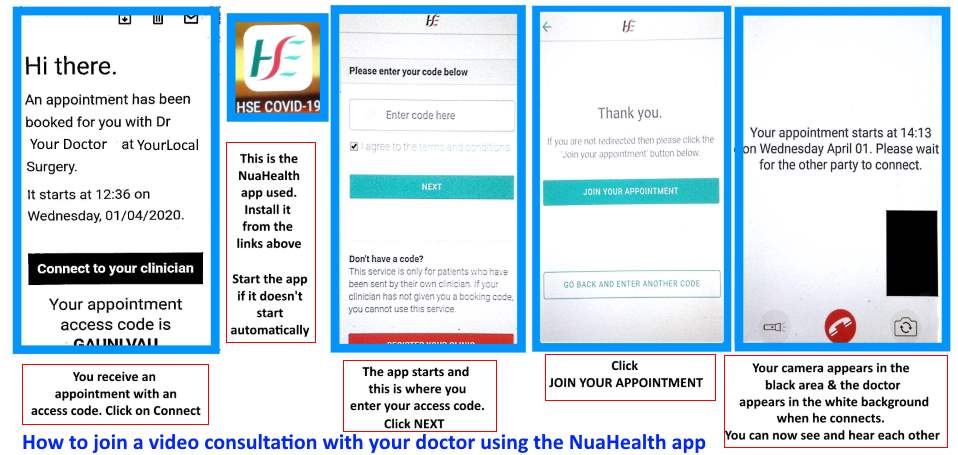
To use the app when it is installed, the doctor emails you an 8 letter code which you put in to the app to start your video consultation.
So you will also need to have an email address ready.
They may alternatively send you a text with a link to the appointment.
The app can be downloaded from the links below. You can put it on phone, tablet or laptop. Best to install now to ensure your device has the correct operating system and enough space. Quality will depend on your broadband speed. The app is being improved and updated but works fairly simply now.
Your video consultation will be sent to you in an email similar to that below or alternatively may be sent as an SMS with links.
” You, the patient, will receive an email (or SMS) with a link and unique code to use to enter their consultation room. This will be sent by your clinician. “
| Hi there. An appointment has been booked for you with Dr Your Doctor at YourLocal Surgery. It starts at 10:00 on Wednesday, 01/04/2020. Connect to your clinician Your appointment access code is ABCXYZWV For the best experience, please download our smartphone app. For an efficient appointment, please follow these guidelines. Install our app if you’re using a smartphone or tablet If you are using an iPhone or iPad, please download our iOS app here. If you are on an Android Device, please download our Android app here. Can’t install the app on your smartphone?Please ensure your device is up to date with the latest software and use:Safari browser on iPhone or iPad Chrome browser on Android devices Using a laptop instead of a smartphone? Please ONLY use the latest version of one the following: Google Chrome Firefox Opera Safari (Mac only) Check your network You must have a solid and fast Internet connection.Do not use a Corporate Network or VPN connection. Please disable any VPN or firewall. If you are on WiFi, rebooting your router can help considerably. Simply turn off your router, wait 30 seconds and turn it back on again. Limit usage of other applications which use the internet elsewhere on your network; e.g. YouTube, Netflix, etc. If you are using your phone’s data plan, a strong 3G (or ideally 4G) is normally required. Connect on time in a private location.Please log in and connect to the session at least 5 minutes before your booking.Please ensure you are in a private location and not moving (e.g. in a car or train) as this will cause network issues.While we will do all we can to help, please be aware, we cannot be held responsible for issues with your device or Internet connection.Kind regards, NuaHealth |
You also need a good Internet Connection.You can use any online tester, this one is good https://www.speedtest.net/
Ideally, you need a solid connection with 2Mbs up and 2Mbs down, otherwise your clinician won’t be able to see you.
If you are planning on using your phone’s data, a 4 (or even 3) bars phone signal on 3G or 4G is normally sufficient for a Video Consultation.
The app looks like this, and is simple in operation.
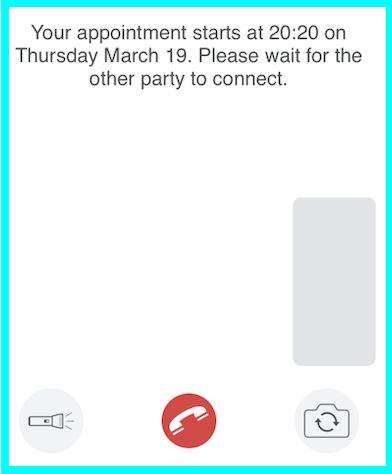
You will see the doctor in the main screen with your picture in the small window.
The Flashlight icon switches on and off your phones flashlight to help illuminate.
The Camera icon switches between front and rear camera.
Other options may be added in time.
It may be possible to switch on or off camera depending on your device (or updated versions) to improve sound quality when needed on a slower connection.
On your laptop
To use your laptop you need to open your Web browser (Chrome, Firefox, Safari or Opera) and open https://www.nuahealth.com
Then click Start Your Consultation and enter your access code to begin your consultation.